
A Chart of Accounts (COA) is the foundation of your bookkeeping system. It organizes your business’s income, expenses, assets, liabilities, and equity so you can generate accurate financial reports and make better financial decisions. Whether you’re setting up a new QuickBooks Online account or cleaning up an existing one, a well-structured COA can make your bookkeeping more consistent, your reporting clearer, and your tax preparation easier.
What Is a Chart of Accounts?
A Chart of Accounts (COA) is an organized list of the financial accounts used to track your business transactions. It provides the structure for categorizing income, expenses, assets, liabilities, and equity.
Your COA is also the foundation for financial reports such as your profit and loss statement and balance sheet. When accounts are organized consistently, these reports become easier to understand and use for decision-making.
Why Is a Chart of Accounts Important?
A well-structured COA can help your business:
- Keep finances organized by grouping transactions into clear categories.
- Improve financial reporting by ensuring transactions are recorded consistently. Keeping your accounts organized is also an important part of keeping your bookkeeping accurate and tax-ready.
- Simplify tax preparation by making it easier to identify relevant income and expenses.
- Support better decisions by providing clearer information about revenue and costs.
- Make bank reconciliations easier by keeping accounts organized and reducing errors.
How Should You Number a Chart of Accounts?
A logical numbering system makes your COA easier to navigate and expand as your business grows.
A common structure is:
- 1000–1999: Assets
- 2000–2999: Liabilities
- 3000–3999: Equity
- 4000–4999: Revenue
- 5000–6999: Expenses
Instead of assigning accounts sequentially, leave gaps between account numbers. For example, using 1010, 1020, and 1030 instead of 1001, 1002, and 1003 leaves room to add accounts later without reorganizing your entire COA. Keep account names clear and consistent, and avoid creating unnecessary categories that make your bookkeeping more complicated than it needs to be.
If you’re setting up or restructuring your bookkeeping system, you can also use our small business bookkeeping template to help keep your financial records organized.
What Are the Best Practices for Adding New Accounts?
Before creating a new account, review your existing COA to make sure a similar account doesn’t already exist.
When adding an account:
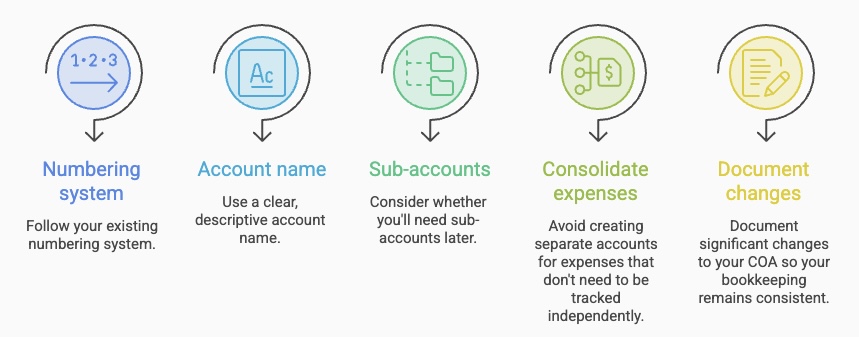
- Follow your existing numbering system.
- Use a clear, descriptive account name.
- Consider whether you’ll need sub-accounts later.
- Avoid creating separate accounts for expenses that don’t need to be tracked independently.
- Document significant changes to your COA so your bookkeeping remains consistent.
The goal isn’t to create as many accounts as possible. It’s to create enough detail to produce useful financial information without making your bookkeeping unnecessarily complicated.
What Are Sub-Accounts in QuickBooks Online?
Sub-accounts allow you to track more detailed information within a broader account.
For example:
5100 – Office Supplies
- 5101 – Printer Ink
- 5102 – Paper Supplies
This structure allows you to see detailed spending while keeping your overall Chart of Accounts organized.
Sub-accounts can be useful when you need more detailed reporting, but they should be used selectively. Too many sub-accounts can make financial reports harder to interpret. If you’re looking to get more from QBO beyond basic account organization, explore our blog to bookkeeping tools for Canadian small businesses.
If you’re unsure whether your Chart of Accounts is too detailed, too broad, or structured incorrectly, a professional review can help you create a system that supports accurate reporting without unnecessary complexity.
Is a Chart of Accounts the Same as a General Ledger?
No. The two are related but serve different purposes.
Chart of Accounts: The list of accounts your business uses to categorize financial transactions.
General Ledger: The detailed record of transactions posted to those accounts.
Think of the COA as the index or table of contents, while the general ledger contains the detailed financial activity behind each account.
Is a Chart of Accounts the Same as GIFI?
No. A COA and GIFI serve different purposes.
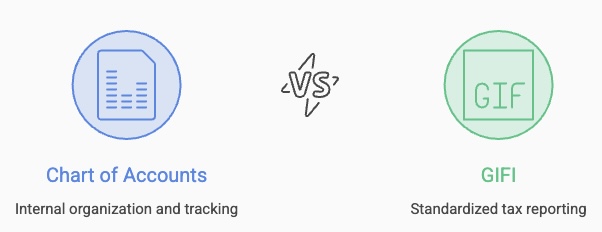
Chart of Accounts (COA): Used internally to organize and track your business’s financial transactions.
GIFI (General Index of Financial Information): A standardized coding system used in Canadian tax reporting to classify financial statement information.
Your COA can help organize the information needed for tax preparation, but it isn’t the same thing as GIFI.
Example Chart of Accounts for a Small Business
Here’s a sample COA template that follows the best practices outlined above. This is ideal for small businesses using QuickBooks Online:
1. Assets (1000–1999) – What Your Business Owns
| Number | Account Name | Type |
| 1010 | Business Checking Account | Bank |
| 1020 | Business Savings Account | Bank |
| 1100 | Accounts Receivable | Accounts Receivable |
| 1200 | Computer Equipment | Fixed Asset |
| 1300 | Office Furniture | Fixed Asset |
| 1400 | Prepaid Expenses | Other Current Asset |
2. Liabilities (2000–2999) – What Your Business Owes
| Number | Account Name | Type |
| 2010 | Business Credit Card | Credit Card |
| 2100 | Accounts Payable | Accounts Payable |
| 2200 | GST/HST Payable | Other Current Liability |
| 2300 | Business Loan Payable | Long-Term Liability |
3. Equity (3000–3999) – Owner’s Investment & Retained Earnings
| Number | Account Name | Type |
| 3010 | Owner’s Capital | Equity |
| 3020 | Owner’s Draw | Equity |
| 3100 | Retained Earnings | Equity |
4. Revenue (4000–4999) – Money Earned
| Number | Account Name | Type |
| 4010 | Sales Revenue | Income |
| 4020 | Consulting Services Revenue | Income |
| 4100 | Discounts Given | Income (Contra Account) |
5. Expenses (5000–6999) – Business Costs
| Number | Account Name | Type |
| 5010 | Advertising & Marketing | Expense |
| 5020 | Website & Hosting Fees | Expense |
| 5100 | Office Supplies | Expense |
| 5200 | Software Subscriptions | Expense |
| 5300 | Business Insurance | Expense |
| 5400 | Professional Fees (Legal, CPA) | Expense |
| 5500 | Rent Expense | Expense |
| 5600 | Utilities (Internet, Phone) | Expense |
| 5700 | Travel & Meals | Expense |
| 5800 | Bank Fees | Expense |
6. Other Income & Expenses (7000–7999) – Non-Operational Items
| Number | Account Name | Type |
| 7010 | Interest Income | Other Income |
| 7100 | Loan Interest Expense | Other Expense |
Conclusion
Your Chart of Accounts should make your financial information easier to understand, not harder. A logical numbering system, consistent account names, and appropriate use of sub-accounts can improve reporting and make your bookkeeping easier to manage as your business grows.
If you’re setting up QuickBooks Online or reviewing an existing Chart of Accounts, professional guidance can help ensure your bookkeeping structure supports your reporting and tax needs.